👩💻 Basic Linux Shell Scripting for DevOps

🤔What is Shell Script?
Shell scripting is a powerful tool that can help automate repetitive tasks and simplify complex tasks. It is a way to write scripts that can be executed by the shell, which is a command-line interface to the operating system. Shell scripts can be used to perform a wide range of tasks, from simple file management to complex system administration tasks.
Here are some reasons why we need shell scripting:
Automation: Shell scripts can automate repetitive tasks, such as backups, file management, and system maintenance. This can save time and reduce the risk of errors.
Simplicity: Shell scripts are easy to write and debug compared to other programming languages like C or C++. They are also easier to learn for people who are new to programming.
Portability: Shell scripts can be transferred to other UNIX and similar operating systems and executed. This makes it easy to share scripts with others.
Customization: Shell scripts can be customized to suit specific needs. They can be used to create custom tools and utilities that are tailored to specific requirements.
💁♂️ Why do We learn Shell Script for DevOps?
In DevOps, shell scripting plays a crucial role in automating repetitive tasks and streamlining the deployment and management of applications. With shell scripting, DevOps engineers can write scripts to automate tasks such as installing software packages, configuring systems, setting up network connections, and managing files and directories.
For example, if you use the AWS user data option, there is a chance you will use a shell script inside it.
🐱👤 Getting started with shell scripting
Before getting started with shell scripting, you should be comfortable working with Linux commands. If you are new to Linux, you could start by spinning up a few Linux servers locally using Vagrant or on cloud platforms like AWS or Google Cloud.
Once you are comfortable with Linux commands, you can start learning shell scripting by studying basic concepts such as variables, loops, and conditional statements.
💻 Basics of shell scripting
Variables are used to store data in a script. Loops are used to repeat a set of commands multiple times. Conditional statements are used to execute different commands based on certain conditions.
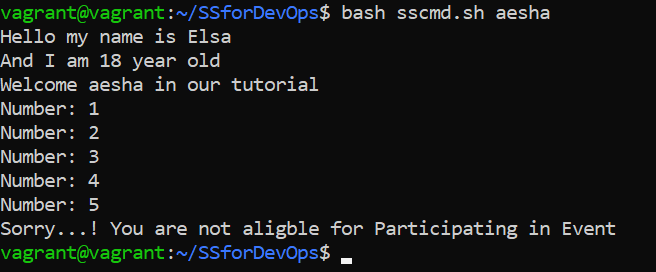
Here is an example of a simple script that uses variables, loops, and conditional statements:
Comments :
Any line starting with a hash (#) becomes a comment. Comment means that the line will not take part in script execution. It will not show up in the output.
echo :
Prints a string of text, or value of a variable to the terminal.
Variables :
Variables let you store data.
You can use variables to read, access, and manipulate data throughout your script.
There are no data types in Bash. In Bash, a variable is capable of storing numeric values, individual characters, or strings of characters.
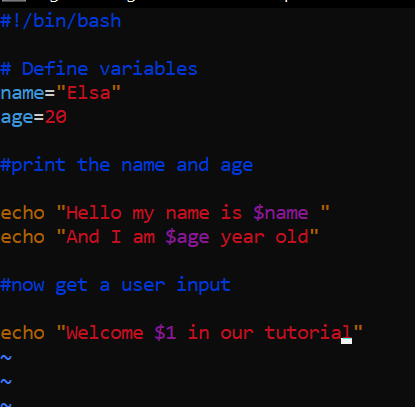
In the above script, I can use
#!/bin/bashis called a shebang and it is a special type of comment that is used to specify the interpreter that should be used to execute a script. When a script is executed, the shell looks at the first line of the script file, and checks for the shebang. The#!/bin/bashshebang specifies that the script should be executed using the Bash shell.We can also use
#!/bin/shas well. The#!/bin/shshebang specifies that the script should be executed using the Bourne shell or a compatible shell. The Bourne shell is an older shell that is less powerful than the Bash, but it is still widely used in many systems.Note :
For the open script file, you can write vim or vi file1.sh
vim file1.sh
#!/bin/bash

# Define variables
name="Elsa"
age=18

#print the name and age

echo "Hello my name is $name "
echo "And I am $age year old"

#now get a user input

echo "Welcome $1 in our tutorial"

# Loop through numbers 1-5
for i in {1..5}
do
          echo "Number: $i"
  done

# Check if age is greater than 18
  if [ $age -gt 18 ]
  then
           echo "You are aligble for Participating in Event"
  else
          echo "Sorry...! You are not aligble for Participating in Event"
  fi
Basic Operators
Arithmetic Operators
Simple arithmetics on variables can be done using the arithmetic expression: $((expression))
#!/bin/bash
A=2
B=$((100 * $A + 5)) # 205
The basic operators are:
a + b addition (a plus b)
a - b subtraction (a minus b)
a * b multiplication (a times b)
a / b division (integer) (a divided by b)
a % b modulo (the integer remainder of a divided by b)
a ** b exponentiation (a to the power of b)
Arrays
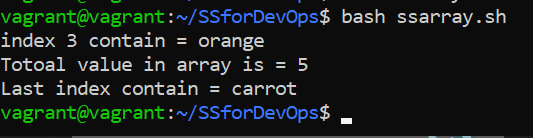
An array can hold several values under one name. Array naming is the same as variable naming. An array is initialized by assigning space-delimited values enclosed in ()
#!/bin/bash

#Array
my_array=(apple banana "Fruit Basket" orange)

echo "index 3 contain = "${my_array[3]}                     # orange - note that curly brackets are needed
# adding another array element
my_array[4]="carrot"                    # value assignment without a $ and curly brackets
echo "Totoal value in array is = "${#my_array[@]}                    # 5
echo "Last index contain = "${my_array[${#my_array[@]}-1]}
~
Shell Functions
Like other programming languages, the shell may have functions. A function is a subroutine that implements a set of commands and operations. It is useful for repeated tasks.
# basic construct
function function_name {
  command...
}
Functions are called simply by writing their names. A function call is equivalent to a command. Parameters may be passed to a function, by specifying them after the function name. The first parameter is referred to in the function as $1, the second as $2 etc.
#!/bin/bash
function function_B {
  echo "Function B."
}
function function_A {
  echo "$1"
}
function adder {
  echo "$(($1 + $2))"
}
✅Real-world use cases
Shell scripting can be used in many real-world scenarios. For example:
Automating backups: You can write a script that automates backups of important files or databases.
Deploying applications: You can write a script that automates the deployment of applications to servers.
Managing users: You can write a script that automates the creation and deletion of user accounts.
Monitoring systems: You can write a script that monitors system resources such as CPU usage or disk space.
📝Best practices
Here are some best practices for writing efficient and maintainable shell scripts:
Use comments: Comments help other people understand your code.
Use indentation: Indentation makes your code easier to read.
Use descriptive variable names: Descriptive variable names make your code easier to understand.
📜Conclusion
Shell scripting is an essential skill for DevOps engineers. With shell scripting, you can automate repetitive tasks and streamline complex tasks. By following best practices for writing efficient and maintainable scripts, you can create powerful tools that help you manage your systems more effectively.